WordPress plugin for weddings, galas and dinners
Seat every guest, beautifully.
SeatCraft puts your seating plan on your own WordPress site. Draw the tables on a picture of the venue, keep the guest list with RSVPs, meals and dietary notes, and publish a chart where each guest types their name and finds their table.
- One-time price, no subscription
- Block and shortcode
- Right-to-left layouts
- No outside services
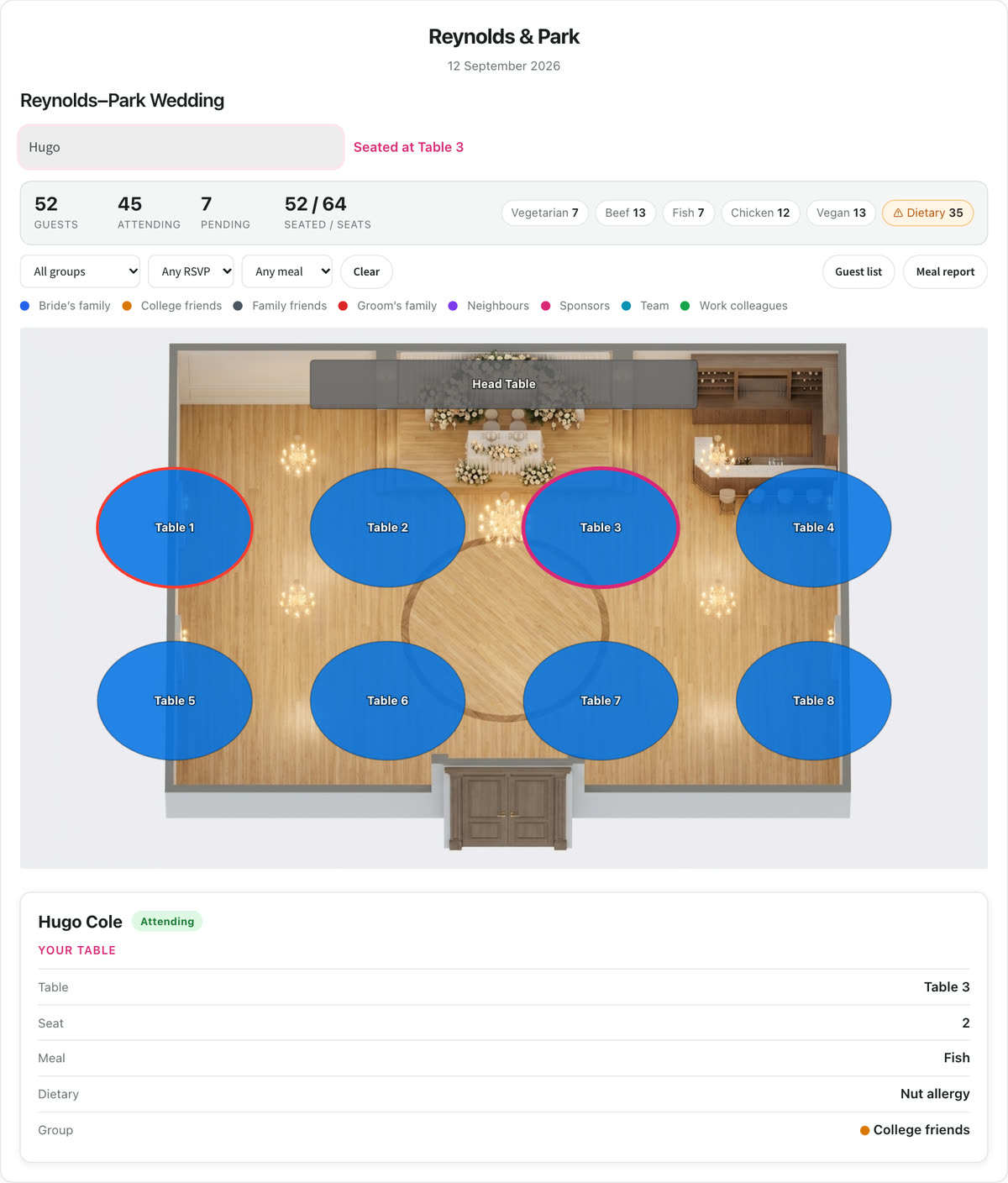
Tap a table to see who sits there, or search a name above.
A copy of the demo’s Reynolds–Park wedding: the same tables and the same 52 guests. The red ring is SeatCraft’s warning for a table with more guests than seats.
See it run, start to finish
A 98-second recording of the live demo: what guests see first, then the planner’s screens in WordPress. Pick a chapter to jump to it.
Silent, with captions. The demo account can open every screen but cannot save, so the film shows nothing being saved.
What your guests see
One page with the room on it. Share the link, or print it on a sign at the door.
They type their name
Two letters are enough. Their table lights up on the plan.
They see their card
Below the plan: their table, their RSVP and their meal.
Or they tap a table
Hovering shows how full it is; a tap lists everyone sitting there.
Inside WordPress
Screenshots from the demo site. You can log in with the demo account and open the same screens.
Draw the room once
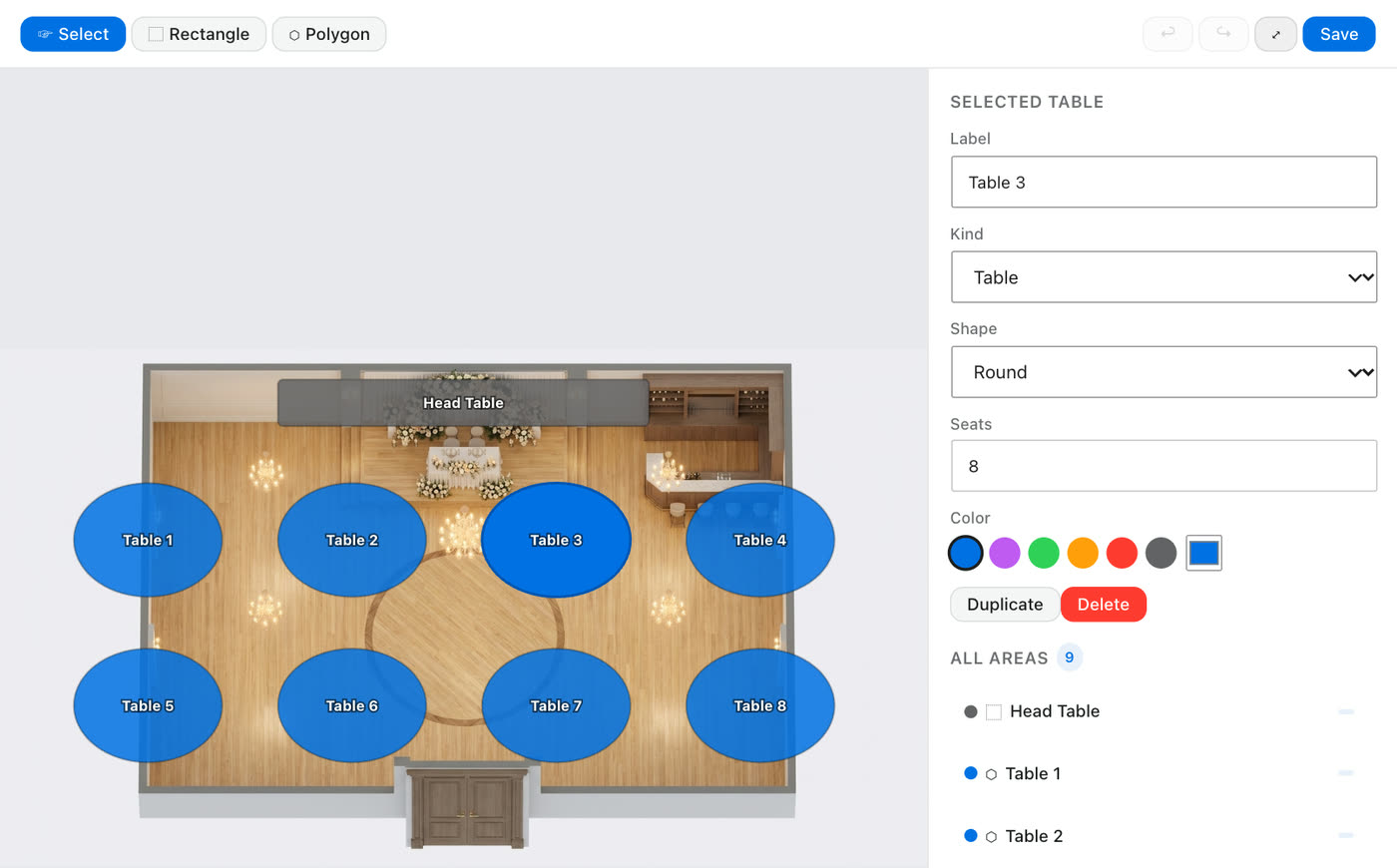
Pick a picture of the venue from the Media Library, then draw each table over it. Select a table to change it.
- Round or rectangular tables, plus a stage or area
- A name and a seat count for each table
- Colours, duplicate, undo and redo
- Event name, date and right-to-left layout per chart
One list for every guest
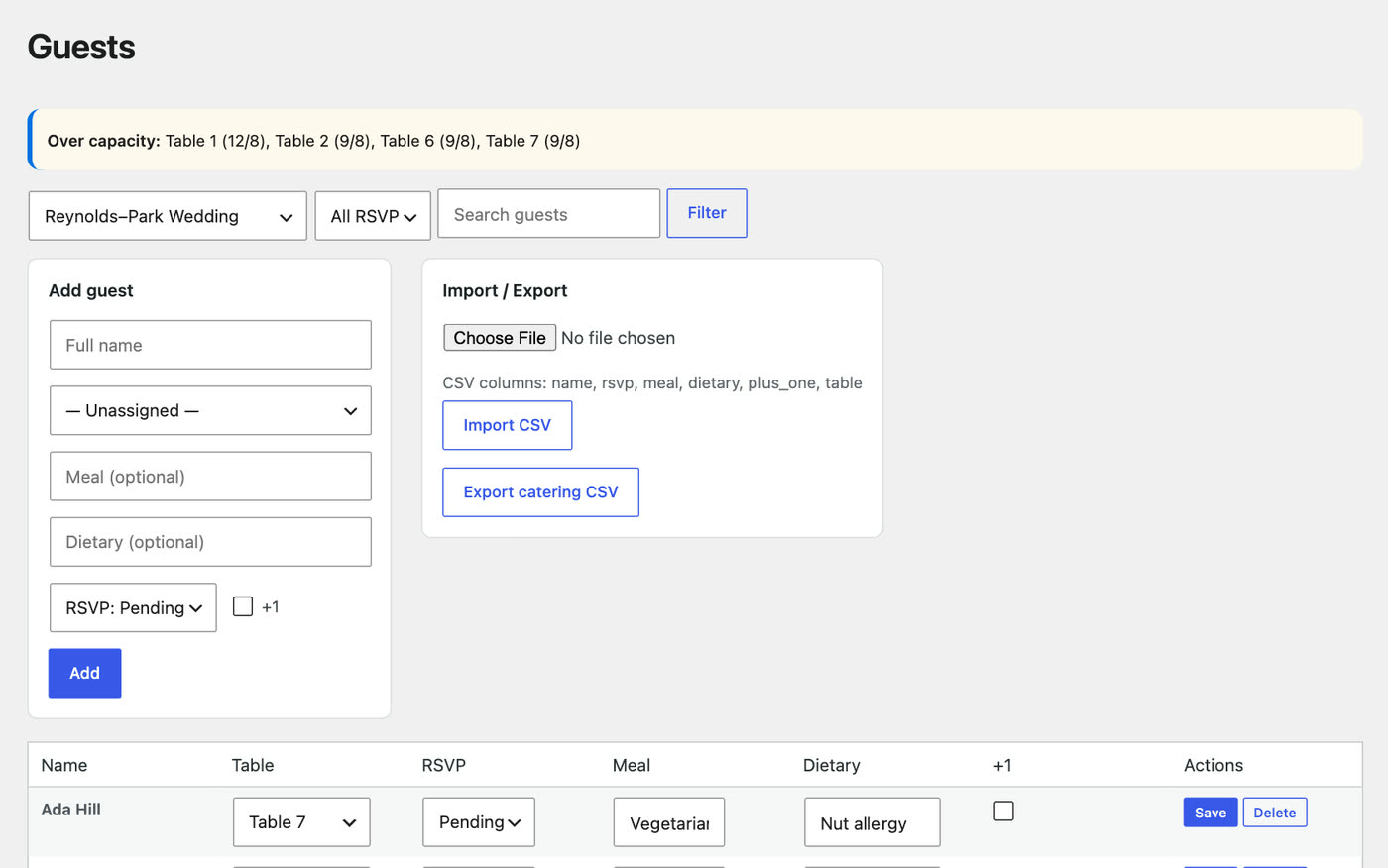
Pick a chart and work down the list: table, RSVP, meal, dietary note and plus-one for each guest.
- Add guests one by one or import a CSV
- Tables with more guests than seats are named at the top
- Filter by RSVP or search a name
- Export a catering CSV for the kitchen
What the kitchen needs
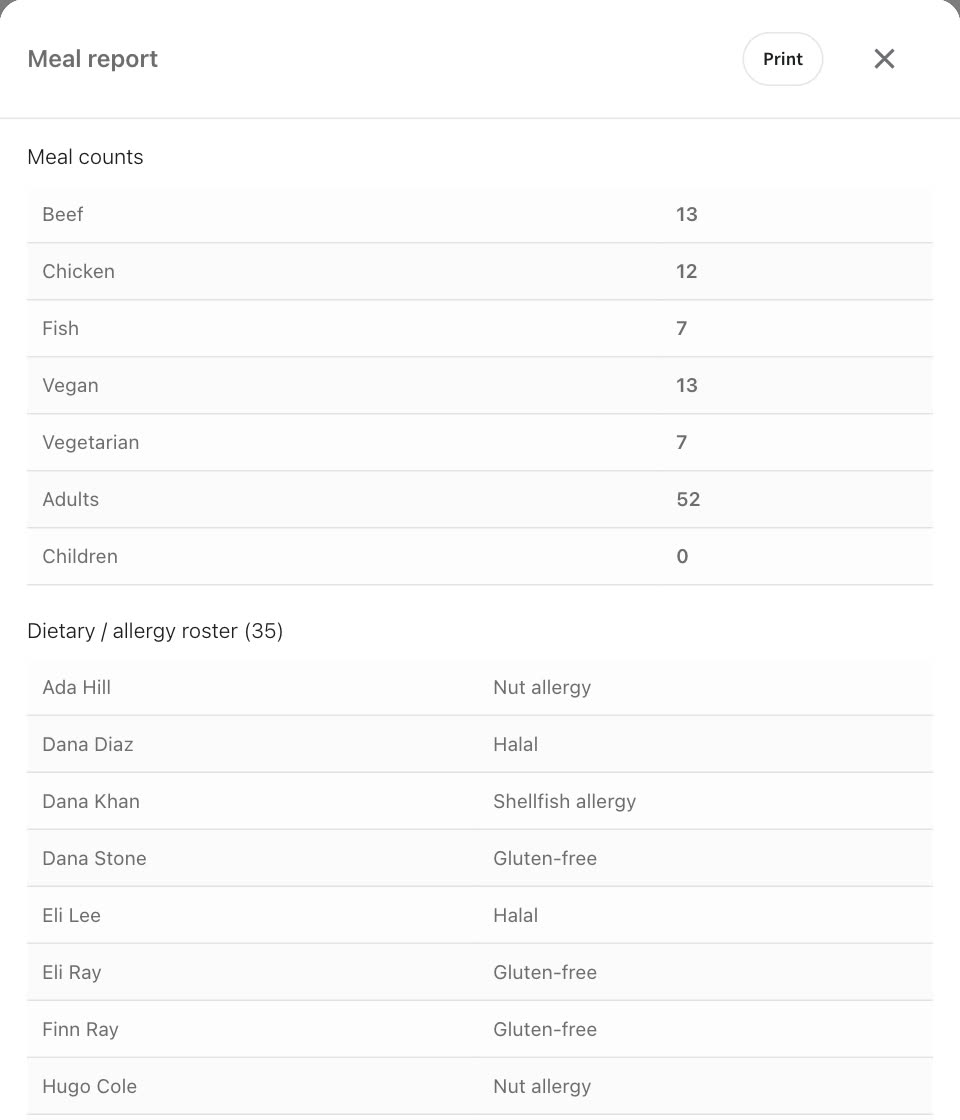
On the chart page, logged in as a chart manager, the Meal report button counts every meal choice and lists each guest who has a dietary note. It has its own print view.
- A count for each meal
- Adults and children (children counted from a kids’ meal)
- Dietary and allergy notes by name
- Can be switched off for each chart
A list for the door
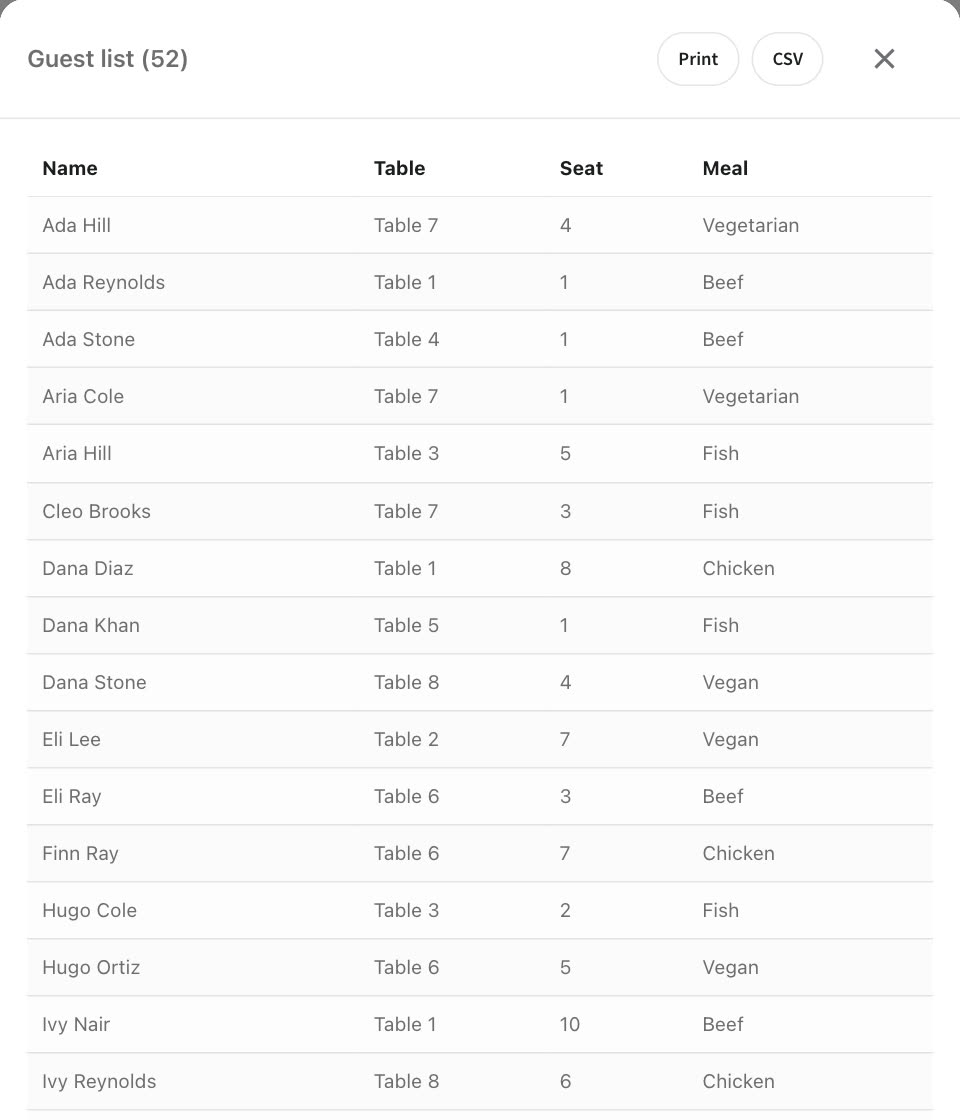
The Guest list button shows everyone in alphabetical order with their table, ready to print or download as CSV.
- Alphabetical, with each guest’s table
- Print view
- CSV download
Try the admin yourself
Log in to the demo’s WordPress with the account below. You can open every chart and guest; saving is switched off on the demo.
- Username
demo- Password
SeatCraftDemo!
What’s in the plugin
One plugin, no add-ons. It runs on your site and calls no outside service.
A chart per event
Make as many charts as you need, each with its own floor plan and guest list.
Live totals on the chart
Guests, attending, pending, seats filled and a count for each meal, above the plan.
Filters that fade tables
Pick an RSVP state or a meal and the tables without a match fade out.
Right-to-left
Switch it on per chart and the whole chart mirrors for Arabic or Hebrew. See the demo.
Block or shortcode
Place a chart with the Guest Map block or [seating_chart id="12"].
Staff access
Let editors or shop managers open the guest list without giving them the plugin settings.
Buy once
Sold on our store with Paddle as the merchant of record: Paddle issues the invoice and handles VAT and refunds.
SeatCraft
- 1 WordPress site
- 1 year of updates and support
- Full GPL source, runs on your server
- Licence key and download link by email
30-day refund policy · Licence terms
Questions
Something else? Read the documentation or write to support@webkoding.com.
Does SeatCraft sell tickets or take payments?
No. It plans who sits where. There is no checkout, and the chart your guests see is read-only.
How do I get my guest list in?
Add guests one by one on the Guests screen, or import a CSV with the columns name, rsvp, meal, dietary and plus_one. Then choose each guest’s table from the menu in their row.
Can I drag guests onto tables?
Not yet. You draw and move tables on the floor plan; a guest’s table is chosen from a menu on the Guests screen.
How do guests find their table on the day?
They open the chart page, type their name, and their table lights up with their card below the plan. No app and no login.
Who can see the guest information?
Visitors to the chart see the floor plan and how many guests sit at each table. When someone types at least three letters of a name, the search returns only the matching guests’ name, table and seat, at most five at a time. RSVPs, meals, dietary and allergy notes, groups, the guest list and the meal report reach only people logged in to your site who can manage charts. Declined guests never appear.
What does the caterer get?
The Meal report on the chart page (for logged-in chart managers), and a catering CSV from the Guests screen with name, table, RSVP, meal, dietary note and plus-one. The CSV is protected against spreadsheet formula injection.
What do I need?
WordPress 6.0 or newer and PHP 7.4 or newer. A venue picture is optional; tables also work on a plain background.
Is it translation-ready?
Yes. It ships with a .pot file, and each chart can switch to a right-to-left layout.
Know where everyone sits before the doors open
Search a name in the demo wedding, then log in to open the meal report and the floor plan editor.